

How to Fix an Unresponsive iPhone Home Button in 3 Easy Steps
September 28, 2012 by Phil Montero · 11 Comments
Having problems with the Home button on your iPhone not working or being very unresponsive? You’re not alone. I’m going to show you an easy quick way to fix your iPhone!
The home button on my iPhone used to be unresponsive to the point where it wouldn’t respond at all or I had to push it 4 or 5 times just to get it to work. Very frustrating!
Well don’t panic . . . there’s no need to restore your phone, take it apart or pay someone $100 or more to fix it for you. I found a quick easy way to fix the iPhone home button problem using nothing more than isopropyl alcohol and a q-tip.
Watch this video to see these 3 Easy Steps to fix your unresponsive iphone home button.
[iframe src="http://www.youtube.com/embed/ZtQ18n7PzRM?list=UUvQGZUOn8dZQW7mm-ZqoBPA&hl=en_US" frameborder="0" width="600" height="338"]
IMPORTANT NOTE: If you were using your iPhone home button problem as an excuse to upgrade to the new iPhone 5 . . . move along there’s nothing to see here – don’t worry I won’t tell anyone . . . lol!
If this didn’t do the trick for you I did come across another technique that seems to have worked for some which involves using the sync cable and gently pushing to realign home button. You can find a video on how to use this method here.
Did this fix your problem? If so please take a moment and post a comment below and let me know I helped you out. Don’t miss a video – Subscribe to our YouTube Channel!
Smartphones – Broadening Business Boundaries
May 25, 2012 by The Anywhere Office · 2 Comments
 This guest post was submitted to The Anywhere Office by Sapna of Taaza.com
To what extent is today’s workforce adapting to the features that the smartphone offers cannot be exactly determined. The smartphone has taken communication to a whole new level. With features like Wi-Fi connectivity, fast processors and futuristic applications, smartphones have improved efficiency and made work fun in the process. Taking into account the rate at which the technology has been improving, the change in today’s work environment is quite noticeable.
Social Media Plug-ins – With Facebook, Twitter, Linkdin and now Pinterest reaching out to everyone globally, accessibility of these social media platforms are being improved on a daily basis. The transition from desktops to mobile to satisfy browsing needs has been tremendously fast. Sharing information on facebook and promoting it on twitter is just a few touches or buttons away. Public Relations and corporate communications have become extensively easy with the social media addition on the smartphone.
Live Feeds – RSS feeds and news feeds for related information can be streamed into the mobile with ease. At work, knowledge is power and acquiring relevant knowledge has never been easier. With relevant feeds, everyone is armed with knowledge as the deals could be worked out and strategies could be planned with the right information obtained at the right time.
Chat Applications – Blackberry’s BBM and Whats App for the rest of the phones have actually given a new meaning to instant communication. Speaking to a colleague or a team mate from any part of the world has become child’s play these days. Getting in touch with a business client and arranging appointments has never been simpler. This in-turn improves the communicability within the organization and also externally.
Maps – One of the most useful additions to the array of smart phone features is the navigation application loaded with maps. It also serves as a guide to the lost traveler as it gives out a person’s current location and the suggested route to the destination. A dream just comes true for the sweating door-to-door salesman as he can easily figure out his way around the city. Moreover, it also helps a frequent traveler to navigate his/her way through decent places to visit and spend the night at hotels well within the required budget. This in turn has helped the business traveler as searching for an office at new destinations is no more a difficult task.
The mobile phone manufactures make it a point to add in new features almost daily in order to make their products stand out from the rest. It is now up to today’s work-force to get their hands on one of these smartphones and start touching screens or pushing buttons to enhance personal productivity at work.
Author Biography: This is a guest article written by Sapna, Manager at Taaza.com, an Indian horizontal site. Significant verticals include Jobs, Classifieds, News, Education, Photos, Movies, Shopping and Finance.
Top Apps in 2012 For Telecommuters
March 13, 2012 by Phil Montero · 3 Comments
Stay in touch with what matters most—from wherever you work
Thanks to technology I am able to work remotely from home. I’m what you’d call a telecommuter. I’m hooked up for 8-hours a day with my head office, but I don’t work there. How? Well it’s thanks to the thousands of telecommuting apps on the market for the iPhone, Android, T-Mobile Samsung Galaxy S, and BlackBerry smart phone—I’m able to stay productive and efficient with no boss breathing down my neck.
Working from home has never been easier with the following 5 top apps for telecommuters. The following apps help remote workers track time, remind them about important deadlines, offer file-sharing with other remote employees, and offer total online synchronization with the head office. Now they won’t help distract you from watching Ellen every day (for that you’ll need to exercise your own sort of willpower), but they will give you access to all of the critical tools you need so you can work while away from your office or even on the go!
1. Skype (Free – for iPhone and iPad)
Skype for mobile offers video chat with your most important contacts—right at your fingertips. The thing I love the most about Skype is that it’s simple with no fancy bells and whistles. Once you log into your Skype account, you can use the app to call, video chat, or instant message (with nifty emoticons to spice up your messages) anyone in the world. Plus, if you want to call a landline or mobile phone, simply buy some Skype Credit (it’s far cheaper than a phone bill). Skype will also keep track of your recent calls and instant messages so you can look back at work discussions if you need reference.
2. Pinger Textfree (Free – for Android)
The Pinger Textfree app is similar to Skype in that it offers unlimited SMS texts and picture messaging with your personalized Pinger number. However, you can use this app to text friends who don’t even have Pinger Textfree—all you need is a data connection to send texts to anyone around the globe for free. Make Pinger your default text and even reach out to friends on Facebook who don’t have text.
3. Salesforce Mobile (Free – for BlackBerry)
Salesforce mobile gives remote workers peace of mind by putting all critical records and information at their fingertips—regardless of how far away they are from head office. Ideal for telecommuters, Salesforce Mobile helps home-based and remote workers keep their fingers on the pulse of late-breaking office news and projects in real time so they can collaborate easily with remote teams, respond to sales leads, log their own client notes and progress from anywhere, and get live access to the central business dashboard (or project center) to look up sales account activity, and communicate back to teams, even when they’re on the road.
4. Dropbox (Free – for Android)
This app is a file and multimedia sharing cloud for remote-based businesses. I use Dropbox as a remote worker every hour of every day. This app allows me to drop documents, photos, videos, client emails and other correspondence, and business notes into the central Dropbox for sharing with my co-workers from absolutely anywhere. Simply install Dropbox on your computer, drop files into the tool, and Dropbox will instantly save the additions to the central Dropbox folder for sharing across the company. And if you’re away from your computer, you can access your files using the Dropbox app as long as you have a smart phone and a wireless connection. It’s nice to know I always have access to what I need to do my job.
5. Toggl (Free – for iPhone)
Toggl is a time-tracking app that provides both remote teams and telecommuting individuals with easy-to-use web 2.0 time sheets and time tracking reports that are saved to a central system that everyone has access to. The Toggl app’s user-friendly interface will save your workers time because it offers one-click tracking so they can focus on doing their jobs rather than trying to figure out how to use a complex app.
Author Bio: Melanie Gray is a writer for GoingCellular, a popular site that provides cell phone related news, commentary, and reviews on all popular providers.
Mobile Printing with FedEx Office Print & Go (win a free test kit)
August 8, 2011 by Phil Montero · 5 Comments
If you’re a mobile worker on the go, one of the challenges you’ve probably faced is how to print your documents when you’re on the move. Maybe you’re on the road meeting with clients, or on your way to make a presentation, and need to get some handouts or a report printed. Well here’s a solution – a great service I tested recently from FedEx Office called Print & Go. It lets you print from your mobile device or USB flash drive at more than 1600 FedEx Office locations. I was very impressed with how well it worked, so I want to explain what it does and how it works as I know for many of you it’s probably just what you have been looking for.
Let me start by letting you know, in the spirit of transparency, that I was contacted by the folks at FedEx as they were looking for bloggers in the mobile work space to review this new service. They sent me a “test kit” which included a 512 MB USB flash drive pre-loaded with instructions on how to use the service and a $25 FedEx Office gift card to cover the cost of anything I chose to print with the service. They also offered to provide a similar “test kit” for me to giveaway, so make sure you read to the end of this post to find out how you can enter to win.
With FedEx Print & Go you can print from your iPhone®, BlackBerry® smartphone, AndroidTM phone, or USB flash drive. I tested the service with my iPhone 4 as well as the USB flash drive they sent me.
Their service allows you to print to any of their self-service machines. What can you print you ask?
- Accepted file types include Microsoft Word, Microsoft PowerPoint and Adobe PDF documents. (Update – the service now also supports JPG, TIF, and other image formats)
- To print other formats, or for binding and other finishing options, you can see a FedEx Office employee at the store.
To begin using FedEx Office Print & Go from your iPhone, BlackBerry smartphone, or Android device you first have to download the HP ePrint app.
I jumped to the Apple App store and downloaded the HP ePrint app. This app lets you do more than print to the FedEx Print and Go service. It also lets you print to other public print locations as well as to wireless HP printers that support AirPrint.
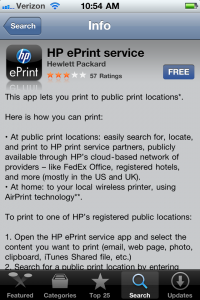
The app wanted to use my current location to find nearby public print locations so I clicked OK. It then asked me to create an account with my email address. I receive an activation code via email and enter into the app and clicked activate to complete the registration process. Read more
Video Review of the Case-mate Pop Case for Verizon iPhone 4 (great case)
March 2, 2011 by Phil Montero · 7 Comments
I recently updated from my iPod Touch to the new Verizon iPhone 4. The first accessory I needed was a good solid case. I don’t like to use belt clips and instead prefer to keep my iPhone in my pocket. Although I love the Rebel Touch Case I have for my iPod Touch they didn’t have the same case available for the new iPhones. Also most other iPhone 4 cases that were designed for the AT&T iPhone 4 would not fit the new Verizon iPhone 4 because some of the buttons on the side moved slightly for the different placement of the antennae on the CDMA version of this phone.
I did lots of research (as usual) and reading of reviews and it seemed Case-mate was one of the first to release a variety of cases specifically designed for the Verizon iPhone 4. There are many different case styles but I don’t like to use a belt clip and prefer a case that has a combination of a solid spine (to protect from impact in case you drop it) but also has a rubber on the sides to help increase the grip to it doesn’t feel like it will slide out of your hand. The Case-mate Pop case seemed to fit the bill – so I ordered one and in this video I show my unboxing as well as my review of this case. Although I need to see if it stands the test of time so far I am VERY happy with this case and feel confident it will keep my precious iPhone 4 safe and sound.
Watch my video review and unboxing below:
What case did you pick for your iPhone and what do you like most about it? Share your thoughts by posting a comment below!
