

Six Rules to Foster Creativity While Maintaining Efficiency Within Your Business
April 29, 2013 by The Anywhere Office · Leave a Comment
This guest post was submitted to The Anywhere Office by Erin Schwartz, a Specialist in Social Media and Affiliate Marketing.

Take a good look at any company or corporation that has been successful at doing business for any length of time and you will undoubtedly discover that they all had their own particular set of systems and processes for managing the daily functions of business: payroll, inventory, invoicing, general bookkeeping, HR and so on. Look a little further and you might even find step-by-step processes and rules in place that govern how they develop and launch new products or services or market themselves to the world.
Systems are a necessary part of keeping control and assuring quality within a business that has more than just a few employees. But when systems are allowed to become etched in stone, forever unchanging, a company is in danger of missing out on emerging technologies that could quite likely improve their bottom line and make them more competitive.
Here are six basic rules that every company, no matter what size, should follow to foster and promote an atmosphere of creativity without sacrificing consistency and quality.
It starts at the top – A company’s culture reflects the ideals and beliefs of the owner(s). Those at the top must continually give the message that change is good and that ideas for improvement are welcome. When top management embraces such a philosophy, it’s a sure bet that those underneath will also espouse similar beliefs.
Banish forever “That’s the Way We’ve Always Done It” – Having teams of people responsible for developing dynamic new products and services is only one way a company shows its creative side. Companies must also recognize that the old, tried and true way of doing something is often made obsolete by a new machine, program or process. Stubbornly refusing to even consider any changes to a ten-year old ordering or inventory system is just ridiculous. As new people join a company, they often bring with them ideas and experience gained from former places of employment. Managers need to welcome new ideas for streamlining basic systems, and not view them as a threat to the status quo.
Encourage and promote brainstorming and problem-solving round-table discussions – The power of the group mind is incredible; by sharing frustrations and successes, employees often discover new and even better ways of doing things just by tossing ideas back and forth in a casual meeting. Energize the boring staff meeting by setting aside 15-20 minutes for a no-holds-barred discussion of what’s working and what’s not, and possible ways to improve. Read more
Can Social Media Marketing Work For Your Business (Or Is It Yet Another Service Marketers Want to Promote)?
March 25, 2013 by The Anywhere Office · 1 Comment
This guest post was submitted to The Anywhere Office by Gean Biffulco of Idea180.com
Can Social Media Marketing Work For Your Business (Or Is It Yet Another Service Marketers Want to Promote)?
The short answer to both questions is, ‘YES.’ Social Media Marketing (SMM) can generate brand awareness (locally, nationally or globally), it can influence purchases (give your brand “social endorsements”) and can even generate a return on investment if set up and measured properly. The problem many businesses run into is they set the wrong expectations about SMM right from the start and then consider they have wasted marketing dollars paying for “fans”, “subscribers” or an “amazing Facebook app/game” that didn’t seem to do anything for sales. This is not only the marketer’s fault for setting the wrong expectations, but also the businesses’ for lacking the proper knowledge.
We have seen the expressions of many business owners who just don’t get what social media is (they call it the Twitter, the Facebook, the YouTube, and others like it), and the truth is that some authors or pseudo-experts can make any internet marketing subject too complex. This is why idea180 has prepared this article, intended for small or medium business owners who want to understand social media in laymen’s terms, and to help determine just how much social media their business needs.
Why Are You Considering Social Media?
If your interest in social media is to have the same high number of Facebook fans as your friend’s page, you can buy a few thousand fans from India or some other countries for a couple of hundred dollars and be done with it. This is not really cheating, it’s just plain stupid. A couple of hundred dollars used in Facebook ads can give your business a few thousand impressions from the right pair of eyes. You can choose if you want your promotional ad to be seen by males or females, specific age ranges, run it in specific towns, cater to people with specific interests, and based your campaign on any other demographic data Facebook collects. You can also decide if you want to create fans for your page or drive traffic to a landing page on your site. If you compare creating “fake fans” made in Pakistan to “targeting the right people”, the choice is obvious – social media is quality over quantity. The right people are more likely to buy than some “fake fan” that could care less about you or your products.
The example above shows how setting the right expectations in SMM matter a lot, thousands of fans means nothing – SMM it’s all about interaction. Some small businesses have only a few clients, not thousands, who generate 100% of their revenue; the relationship with these clients is based in quality interactions.
How Virtual Receptionists Can Benefit Virtual Offices
February 11, 2013 by The Anywhere Office · 6 Comments
 This guest post was submitted to The Anywhere Office by Kevin Gillam of Ruby Receptionists
Whether you wear all the hats in your virtual office or you have staff working from remote locations,there’s often one thing missing – a receptionist. A phone answering service for your virtual office is a simple solution that can provide you with the same invaluable benefits enjoyed by businesses withon-site receptionists.
From forwarding calls to your business number to making calls on your behalf, a virtual receptionist service is the glue that helps hold your operations together, no matter where you or your employees are. Just like on-site receptionists, virtual receptionists provide a variety of services, including: Phone answering with a custom greeting and letting you know who’s on the line before transferring, just like a receptionist in a physical office. Taking messages by hand or forwarding calls to voicemail – both of which can be emailed to you. Connecting calls to any phone number of your choice. Making phone calls on your behalf. Relaying messages and information to callers.
The big companies all have someone to answer the phone on behalf of the head honchos and other employees. There is no reason you can’t have someone providing you with the same professional first impression just because you have a virtual office. When you have an attentive virtual receptionist handling your calls, you provide your callers with a top-notch experience.
USPS Free Package Pickup and Online Postage Payment
October 15, 2012 by Jason Montero · 3 Comments
 Very proud of the United States Postal Service for thinking ‘in-the-box’ and rolling out some great new services that have particular appeal to anyone working in The Anywhere Office.
By now you have probably seen the USPS ad campaign for their new flat rate boxes and envelopes: ‘if it fits it ships’. Well, taking measuring and weighing packages out of the equation and making the shipping fee a flat rate has allowed the post office to make some great strides in door-to-door service offerings. I mean, think about it – they already visit your house and/or office every day.
A friend told me that I could now pay for my postage online and have a package picked up at my door. I went to the USPS website to see for myself and sure enough they were encouraging me to ‘schedule a pickup.’ I saw the possibility to reduce the time suck of yet another dull errand: trips to the post office.
I tested the process and it worked near flawlessly. I entered my address, told them which type of flat rate package I had, chose a day and time for the package to be picked up by my carrier during their regular route, and even got to choose if I wanted to leave the package by the dorr, in the mailbox, or have the carrier knock.
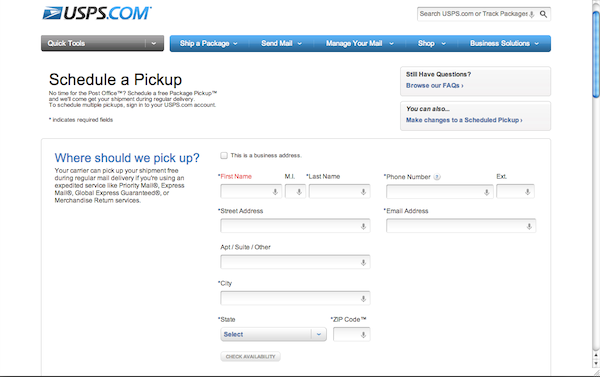
I paid for my shipping right there by credit card and I received a confirmation email Read more
Free eBook on How to Design the Ultimate Home Office
August 10, 2012 by Phil Montero · 5 Comments
Do you have a messy, disorganized and cluttered workspace? If so then I have great news for you – your solution is at hand thanks to an eBook titled How to Design the ULTIMATE Home Office and it’s sure to help you whip your office into shape!
This book was written by Hassan Osman who writes a blog called TheCouchManager.com about working remotely. Being we share a passion for mobile work he sent me a copy of his book to review and I was very impressed with his approach and envious of the photos of his very organized home office.
He normally sells this book for $19.95 but he generously offered to make it available free for one week to members of The Anywhere Office tribe.
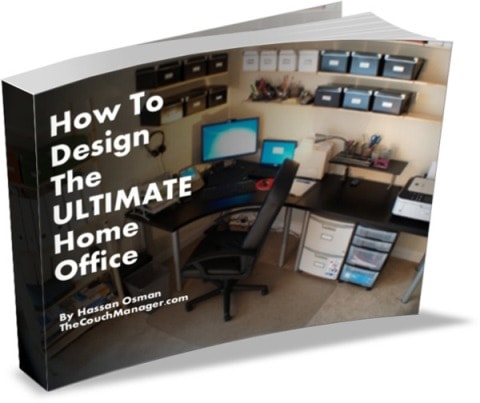 How to Design the ULTIMATE Home Office is a downloadable ebook that will help you transform your home office into a highly efficient space. It contains over 40 pictures that show you what organizers and tools to use and where to best position them for maximum impact.
Here’s what you’ll learn:
- Where to put all that clutter that’s been lingering around
- What types of budget-friendly organizers to use for your reference files and documents
- How to position everything on your desk to save you time and increase your productivity
- Examples of applying the GTD principles on organizing all your “offline” stuff
To get your free copy visit this link and sign up for his “Managing Virtual Teams” newsletter and you’ll receive 2 FREE ebooks:
- “How To Design the ULTIMATE Home Office” ($19.95 value) – a GTD-friendly guide with over 40 pictures that will help you clear up your office clutter and create a more productive workspace
- “Time Zone Meeting Coordination in 7 Easy Steps” – a free guide that will help you schedule virtual team meetings across different time zones without losing your hair (includes a downloadable Excel spreadsheet)
This is a limited-time offer exclusively for The Anywhere Office tribe, so make sure you sign up and download the books before Friday, Aug 17 at 9pm PST!
